
Can You Even Measure AI Visibility? What to Track, What's Free and When to Pay.
)
Everyone agrees AI visibility matters. Almost nobody agrees on how to measure it.
That's because it's a genuinely new category. It's barely two years old, with no shared definitions and no easy way to check one supplier's numbers against another's. And the paid tools get expensive quickly.
In the second webinar of ASP's AI visibility series, Jon Monk, Head of Performance at ASP, explained what you can measure today with tools you already have, at no cost. He also covered when a paid tool starts to make sense, and the questions to ask before you sign up.
His main message: a small, consistent measurement is worth far more than an expensive, comprehensive one you never look at.
Jon opened with a live poll. Two thirds of attendees had already been asked by their boss to report on AI visibility. The rest hadn't been asked yet. Nobody had been asked by their board or commercial director, at least not so far.
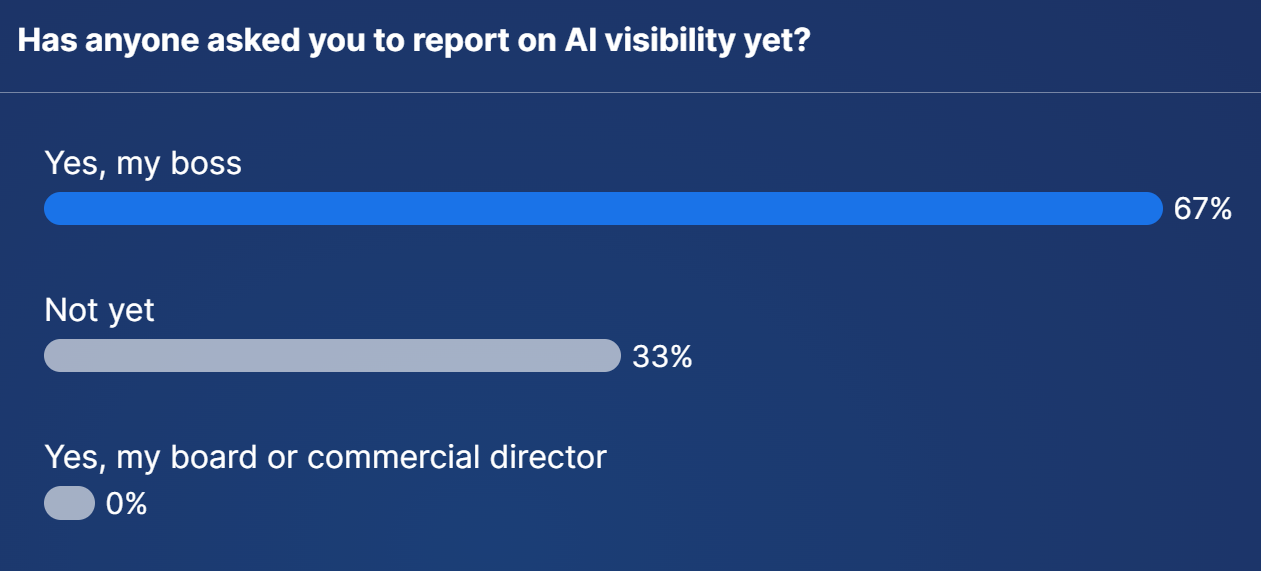
The pressure to report is real. The problem is knowing what to report.
With traditional search engine optimisation (SEO), measurement was fairly straightforward. Google told you roughly how many people searched for a keyword each month. You chose which keywords to target, tracked where you ranked and watched the traffic come in.
AI search breaks that model in three ways.
- Prompts are long and unique - People no longer type "best trainers". They ask detailed, conversational questions, and ten people will ask the same thing ten different ways. Many of these prompts are effectively one of a kind.
- There's no search volume data - The AI platforms don't publish how many people ask a given question. So even if you know you're showing up for a prompt, you don't know how many people that represents.
- There are no benchmarks - If your event appears in 12 out of 20 prompts in your sector, is that good or bad? Right now, nobody knows. The data is too new and there's no industry standard to compare against.
Add in the number of AI tools people use (ChatGPT, Gemini, Perplexity, Claude, Copilot and Google's own AI Overviews and AI Mode), and the reporting quickly becomes less precise than anything SEO teams are used to.
It's tempting to try to track everything. That's where costs spiral.
Take a single event. There might be 10 to 20 sensible questions about the event itself: dates, venue, prices, speakers, how to exhibit. Then split the event into the topics it covers. An AI event might cover machine learning, robotics and more, each with its own set of questions.
Now multiply those prompts by the number of AI tools you want to cover. Then multiply again, because AI answers vary every time you ask, so each prompt needs running several times to get a reliable picture.
Monitoring platforms typically charge by the number of prompts you track, multiplied by the number of AI tools you track them across. Once you want Google AI Overviews, ChatGPT, Gemini, Perplexity and Claude covered, the monthly cost climbs faster than most people expect. If you run a portfolio of events, it multiplies again.
Start with what your buyers actually search for. The answer isn't to track everything. It's to track the right things.Although AI tools don't share search volumes, Google still does. Google also still sends far more visitors to websites than any AI tool, so its keyword data is as useful as ever. Jon uses it to decide which topics matter before choosing a single prompt.
Here's the process he recommends:
- Define your topics. Your conference streams or exhibitor categories are a good starting point.
- Check real demand. Use keyword research and your own Google Search Console data to confirm people search for those topics. For example, you might find around 500 people a month search for "machine learning conference".
- Turn topics into prompts. Tell ChatGPT about your event and the topic you're targeting, and ask it to suggest the questions your audience is likely to ask.
- Start small. Begin with a handful of well-defined prompts about the event itself. Add topic prompts later, once the routine is working.
You can get a surprising amount of AI visibility data without paying for anything. Three free tools do most of the work.
Google Search Console
Search Console now includes a Generative AI report. Go to your property, click Performance, then choose the Generative AI tab.
It shows impressions from Google's AI Overviews and AI Mode, so you can see how often your site appears in Google's AI answers, and which pages are being used. An impression means you appeared, not that someone clicked.
The real value is in the trend. When you improve your homepage, add topic pages or publish new content, you want to see these impressions rise. Jon recently worked with a client to improve their homepage for AI search. By logging the impressions before and after, they could see a significant improvement within three months. Without the report, they wouldn't have known.
There's also a useful signal here. Google won't trust a page in its AI answers if it doesn't trust it in normal search, so SEO can't be ignored.
Bing Webmaster Tools
It's easy to dismiss Bing, but ChatGPT uses Bing's search results to find information. If your site does well on Bing, there's a good chance it will do well in ChatGPT. If it does badly, it probably won't.
Bing Webmaster Tools is free and quick to set up, and you can import your settings from Google Search Console. Its AI Performance report shows how often Microsoft Copilot cites your website. It doesn't show ChatGPT data, unfortunately.
It also groups searches into topics using what Bing calls grounding queries. That's a useful way to see how you perform for a topic such as "machine learning events", not just individual prompts. As a bonus, Bing Webmaster Tools gives you access to Microsoft Clarity, a free heatmapping tool that shows where people click and scroll on your site.
Google Analytics (GA4)
GA4 arguably gives the most useful data of all, because it shows the people who actually visit your website from AI tools.
To find it, go to Acquisition, then Traffic acquisition. Use the dropdown above the table to switch to Session source / medium, and look for AI assistants such as chatgpt.com.
On the sites Jon showed, AI assistants sent around 1% of website traffic, and about 87% of that came from ChatGPT. That's a good reason to start your manual checks with ChatGPT.
Used together, these three tools show whether you're appearing in AI answers, whether that's improving and whether it's turning into visits.
What free tools won't tell you
None of them show how you compare with your competitors. That's the gap paid tools fill.
A second poll showed where most event marketers are right now. Two thirds report on AI visibility manually, now and then. A third don't report on it yet. Nobody was using a paid tool.
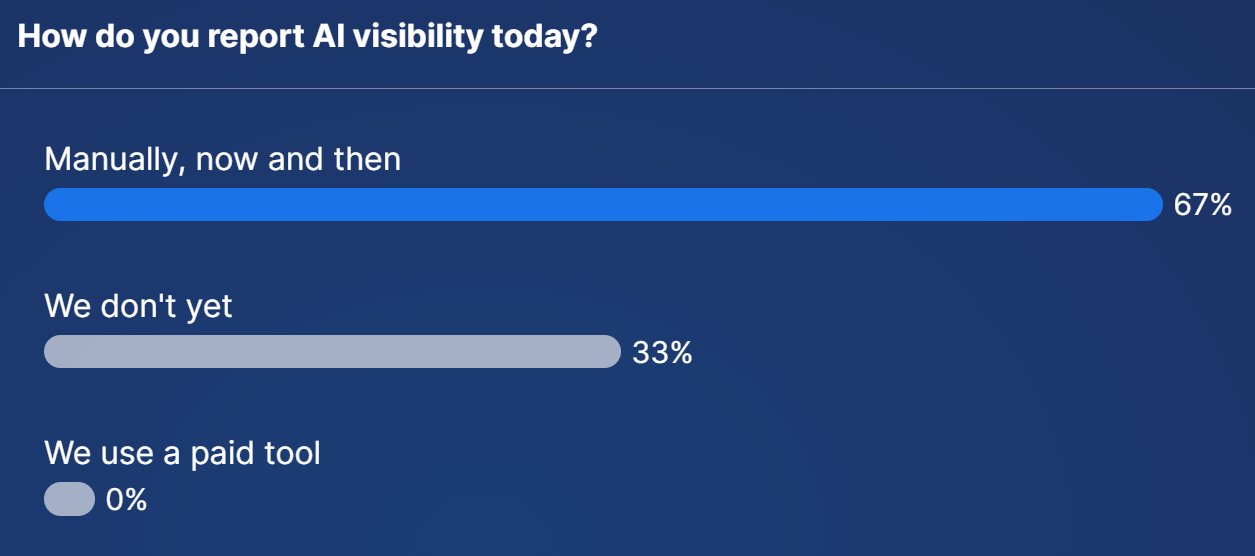
Manual checks are a sensible place to start. The trick is making them consistent.
Showing up is only half the story. The other half is whether what AI says about your event is correct.
Jon ran a live check using a large US trade show. Here's how to do the same for your event:
- Open ChatGPT's Temporary Chat, in the top right. It's like a private browser window, so your own history doesn't affect the answers.
- Ask the basic questions a buyer would ask. When and where is the event next year? How much does it cost to attend? Who's speaking this year? How do I exhibit, and what does it cost?
- Check the answers are correct. Are the dates, venue and prices right?
- Check the sources. Ask "Which sources did you use?" or click the links. Are they your pages, the right pages, or someone else's?
The live demo showed exactly why this matters. The event's dates weren't obvious on its own homepage, and one of the answers was sourced from a third-party website. If someone else is answering questions about your event, you need to take back that narrative, for example with a short block of text or an FAQ on your homepage.
Pricing and registration showed the same pattern. Organisers who keep their registration details on their own website control what AI tools say. If the details only live on a third-party registration platform, mistakes are more likely.
Why AI gets things wrong
- Out-of-date pages. Last year's prices and dates are still on the site, so AI repeats them.
- Missing information. If your site doesn't answer the question, AI looks elsewhere, and other websites may be wrong.
- Guesswork. With nothing to go on, AI may simply make it up.
Why it costs you
People are spending less time on event websites and more time researching in AI tools. That makes the information on your website more important, not less. If AI quotes prices at twice what they really are, you could be losing registrations and enquiries without ever knowing.
The fixes are often simple
- Update your website as soon as the event ends, so AI tools have time to pick up next year's details.
- Put key facts (dates, times, venue, prices, who it's for) on your homepage in plain text.
- Use simple HTML tables for times and prices. They're easy for AI to read.
- Publish speakers early, and make sure they're on real pages rather than a JavaScript widget. Our blog on speaker and exhibitor widgets explains why.
- Give exhibitors the information they're looking for. If you'd rather sell stands by phone, at least publish enough for AI tools to answer the basic questions.
Jon suggests a simple monthly routine that takes two to three hours in total, ideally in the first week of the month.
1. Check your facts (10 minutes). Run five accuracy prompts about your event.
2. Read the free data (20 minutes). Search Console, Bing Webmaster Tools and GA4.
3. Run your prompt set (about 90 minutes). Around 20 prompts across three AI tools.
4. Report (15 minutes). One page, three numbers.
5. Fix one thing. Start with whatever is wrong.
Every quarter, review your topics, check Bing's grounding queries and decide whether a paid tool is worth it yet.
To make the reporting easier, the webinar playbook includes a ready-made prompt that collects your results into a spreadsheet each month, so you can track changes over time.
There has been an explosion of AI visibility tools. Established names such as HubSpot, Cloudflare, Ahrefs and Semrush have all added AI visibility features, alongside a long list of new players. Features and pricing are changing almost weekly.
For one event tracking 50 to 150 prompts, expect to pay roughly £75 to £200 a month. Prices vary widely, and some tools cost more than £300 a month. Across a portfolio of events, that adds up quickly.
There's also a proportion question. If AI tools currently send around 1% of your website visitors, is it worth spending hundreds of pounds a month to report on them? ASP is still holding off on recommending a single tool for exactly this reason.
Should you pay for a tool yet?
Work through these questions in order. If the answer to any of them is no, stick with the free routine for now.
1. Do you check AI gets your facts right every month?
2. Have you run the free routine for three months or more?
3. Do you need to compare yourself with competitors?
4. Will someone act on what the data shows?
If you can answer yes to all four, it's time to trial a paid tool, using your own prompts, before signing any annual contract.
Questions to ask a vendor
- Which AI tools do you check, and from which country?
- How many times do you run each prompt?
- Can I choose and edit my own prompts?
- Can I export the raw answers, not just a score?
- What happens to the price if I double the number of prompts?
Red flags: a single "AI visibility score", an "AI ranking position", or no trial on your own prompts.
You'll see plenty of dramatic statistics about AI and buyers. Look closely before you quote them.
Forrester's Buyers' Journey Survey 2025 found 94% of buyers use AI in their buying process. Gartner surveyed 641 B2B buyers in May 2026 and found 45% had used generative AI. Both are respected research firms. The difference comes down to what counts as "AI" and what counts as "use".
When a vendor tells you 94% of buyers use AI, ask: 94% of whom, and doing what?
Meanwhile, Google still dominates. Around 91% of UK searches still happen on Google, according to StatCounter. Ahrefs found that Google sends 190 times more website traffic than ChatGPT. AI is growing fast, but SEO is still where most of your visitors come from.
- Set up Bing Webmaster Tools. Import your settings from Search Console. It takes about 10 minutes.
- Use ChatGPT's Temporary Chat. It ignores your history, so the answers are closer to what a buyer sees.
- Add a key facts block to your homepage. Dates, venue, price and who it's for, in plain text.
- Ask "Which sources did you use?" It shows you exactly where a wrong fact came from.
ASP's Insights dashboards (a paid add-on) already pull in Google Search Console and Google Analytics data, and are deliberately kept simple and easy to read. If adding AI visibility data from the free sources would help you report internally, let your account manager know.
- The playbook and recording. Everyone who registered receives the AI Visibility Tracking Scorecard, the slides, the monthly reporting prompt and a 10-minute version of the routine.
- Part 3: Is Your Best Event Content Hidden from AI? Tuesday 17 November, 3:30pm. Jon covers how to make sure your content is seen by AI tools, and what content to add to reach the people you want at your event. Register here.
- In-person AI visibility event. Invitation only, in early December. Webinar attendees get first refusal, especially those who've joined all three sessions. Let your account manager know if you're interested.
- The AI visibility newsletter. Monthly practical tips to keep you up to date.
Missed Part 1? Read the summary of Is Your Event Invisible to AI?